VValidatingEntry
Text entry component with validation functionality.
V-ValidatingEntry inherits from V-Entry.
The placeholder text, icons, read-only state, password field, input length restrictions, prefixes, and suffixes work the same as V-Entry, so they will not be repeated here.
Basic Usage
When the text field loses focus, the validation rules are automatically triggered.

The EntryText property needs to be bound to a ValidatableObject<T> object.
<control:VValidatingEntry EntryText="{Binding Email}" />
ViewModel:
Create the property
private ValidatableObject<string> Email = new();
Add validation rules
Email.Validations.Add(new IsEmailRule<string> { ValidationMessage = "Email is invalid." });
The validation rules are provided by the Validations property, which consists of a collection of validation rules.
V-Control includes the following default validation rules:
public class IsEmailRule<T>public class IsNotNullOrEmptyRule<T>public class IsUserNameOrEmailRule<T>public class MaxLenRule<T>public class MinCountOfDigitRule<T>public class MinCountOfUpperLetterRule<T>public class MinLenRule<T>public class LessThanRule<T>public class MoreThanRule<T>
If you need to create custom validation rules, you can create a class that inherits from IValidationRule<T> and implement the Validate() method.
Composite Validation Rules
The Validations property can contain multiple validation rules. Validation is considered successful only when all the rules pass. The error message for the topmost validation rule is displayed by default below the text field.
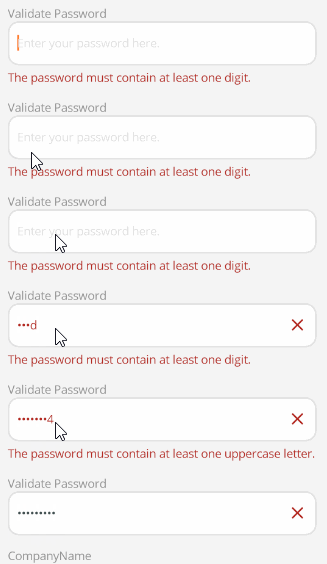
<control:VValidatingEntry EntryIsPassword="True"
                            EntryText="{Binding Password}"
                            EntryPlaceholder="Enter your password here."></control:VValidatingEntry>
ViewModel:
Password.Validations.Add(new MinCountOfDigitRule<string>() { ValidationMessage = "The password must contain at least one digit." });
Password.Validations.Add(new MaxLenRule<string>(16) { ValidationMessage = "The password cannot exceed 16 characters in length." });
Password.Validations.Add(new MinLenRule<string>(8) { ValidationMessage = "The password must be at least 8 characters long." });
Password.Validations.Add(new MinCountOfUpperLetterRule<string> { ValidationMessage = "The password must contain at least one uppercase letter." });
ValidateCommand
Use the ValidateCommand property to execute the command specified by ValidateCommand when validation is triggered.
<control:VValidatingEntry EntryText="{Binding UserName}"
                            EntryPlaceholder="Enter your username or e-mail here."
                            ValidateCommand="{Binding ValidateUserNameCommand}"></control:VValidatingEntry>
In this example, you can further validate the UserName in the ValidateUserNameCommand to achieve an "approve or reject" effect.
ViewModel:
[RelayCommand]
private void ValidateUserName(object obj)
{
    if (UserName.Value != null && !string.IsNullOrEmpty(UserName.Value))
    {
        UserName.IsValid = true;
    }
    else
    {
        UserName.IsValid = false;
        UserName.Errors = new List<string>() { "UserName is required." };
    }
}