VTimeLine
Visually presents time flow information.
Basic Usage
Use the ItemsSource property to bind data.
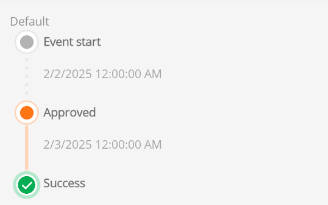
The entries in the data source can control the time flow information through the following properties:
string Title  - Title

string Details - Details

string Date - Date

TimeLineItemType Type - Node style type

Color TitleColor - Title color
The TimeLineItemType is an enumeration that includes the following types:
- Normal - Standard node style
- Active - Current node style
- Success - Success node style
<control:VTimeLine ItemsSource="{Binding ProBarList}"></control:VTimeLine>
ViewModel:
this.ProBarList = new ObservableCollection<ITimeLineItemModel>()
{
    new TimeLineItemModel()
    {
        Date = now.AddDays(-2).ToString("G"),
        Title = "Event start",
        Type = TimeLineItemType.Normal,
    },
    new TimeLineItemModel()
    {
        Date = now.AddDays(-1).ToString("G"),
        Title = "Approved",
        Type = TimeLineItemType.Active,
    },
    new TimeLineItemModel()
    {
        Date = now.ToString("G"),
        Title = "Success",
        Type = TimeLineItemType.Success,
    },
};
Title Color
Bind the object's TitleColor property to set the title color.

ViewModel:
new TimeLineItemModel()
{
    Date = now.ToString("G"),
    Title = "Event start",
    TitleColor = Colors.Red,
    Type = TimeLineItemType.Normal,
},
Details Content
Bind the object's Details property to set the details content.

ViewModel:
new TimeLineItemModel()
{
    Date = now.ToString("G"),
    Title = "Event start",
    Details="Gary accepted merge request!! ",
    TitleColor = Colors.Green,
    Type = TimeLineItemType.Normal,
},