VEntry
常用的文本编辑框组件。
基础用法
基础的文本输入用法

<control:VEntry></control:VEntry>
占位文本
设置 Placeholder 指定占位文本内容

<control:VEntry EntryPlaceholder="User Name"></control:VEntry>
图标
设置 EntryIconText 指定图标,图标的格式为Unicode字符或图标名称。默认为空

<control:VEntry EntryIconText=""></control:VEntry>
只读状态
使文本编辑框处于只读状态
设置 EntryIsReadOnly为 True 属性即可。

<control:VEntry EntryIsReadOnly="True"
                EntryText="Read Only Text !"></control:VEntry>
密码框
使用EntryIsPassword属性即可得到一个可切换显示隐藏的密码框

<control:VEntry EntryIsPassword="True"
                EntryText="Passw0rd!"></control:VEntry>
输入长度限制
使用EntryMaxLength属性设置文本框的最大输入长度

<control:VEntry  EntryMaxLength="8"
                    EntryText="12345678"></control:VEntry>
前缀和后缀
使用ContentSlot和PrefixSlot属性设置文本框的前缀和后缀内容
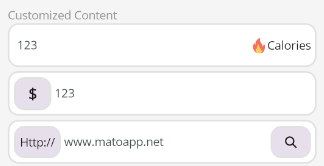
带图标和文本的后缀
 <control:VEntry EntryText="123">

     <control:VEntry.ContentSlot>
         <HorizontalStackLayout HeightRequest="20">
             <Image Source="aze.png"
                    HorizontalOptions="Center"
                    VerticalOptions="Center"></Image>
             <Label Text="Calories"></Label>
         </HorizontalStackLayout>
     </control:VEntry.ContentSlot>
 </control:VEntry>
美元符号($)的前缀
 <control:VEntry EntryText="123">

     <control:VEntry.PrefixSlot>
         <Border Margin="0,5"
                 Padding="15,5"
                 Background="{StaticResource SurfaceVariant}">
             <Label Text="$"
                    FontSize="18"
                    FontAttributes="Bold"
                    VerticalOptions="Center"></Label>
         </Border>
     </control:VEntry.PrefixSlot>
 </control:VEntry>
带网址的前缀和搜索图标的前缀
<control:VEntry EntryText="www.matoapp.net">
<control:VEntry.PrefixSlot>
<Border Margin="0,5"
Padding="5"
Background="{StaticResource SurfaceVariant}">
<Label Text="Http://"
VerticalOptions="Center"></Label>
</Border>
</control:VEntry.PrefixSlot>
<control:VEntry.ContentSlot>
<Border Margin="0,5"
Padding="15,5"
Background="{StaticResource SurfaceVariant}">
<Label
FontFamily="FontAwesome-Solid"
Text=""
VerticalOptions="Center" />
</Border>
</control:VEntry.ContentSlot>
</control:VEntry>